Timetable Periods Guide
This guide helps you manage timetable periods for your school, including defining class periods and break times.
📋 Step-by-Step Instructions
- Navigate to the Timetable Periods page by clicking on 'Timetable' in the Menu.
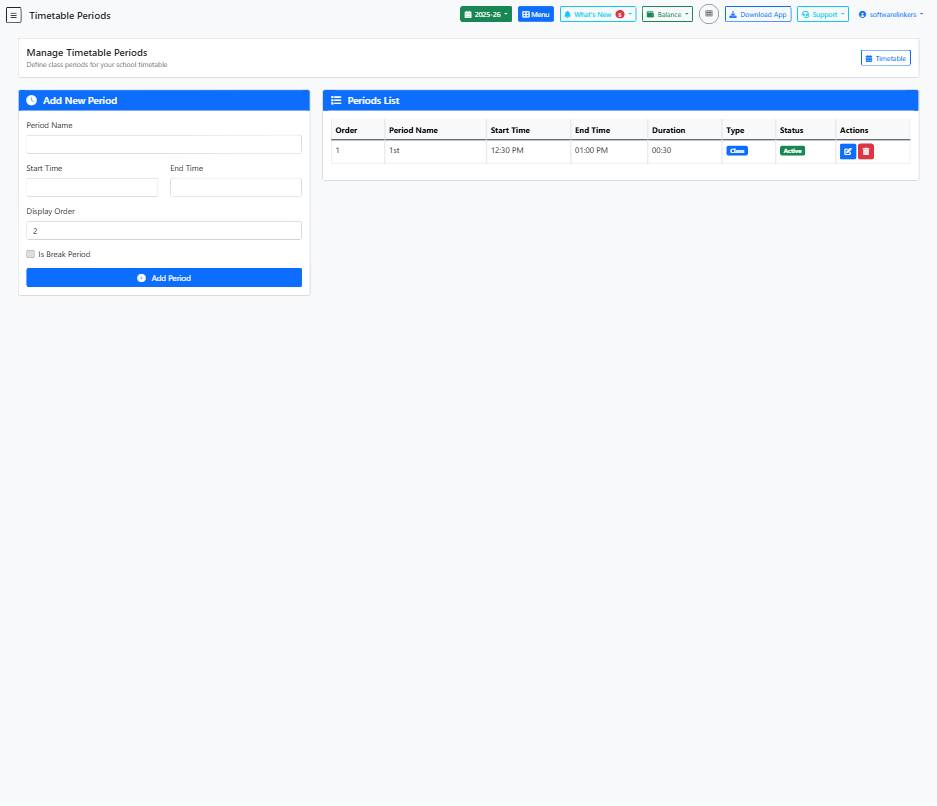
- To add a new period, enter the Period Name, Start Time, End Time, Display Order, and check the 'Is Break Period' box if applicable. Click on 'Add Period'.
- View and manage existing periods in the Periods List section. You can edit period details and toggle the 'Is Active' status.
💡 Helpful Tips
- Use descriptive names for periods to make it easier for teachers and students to follow the timetable.
- Ensure that the Display Order reflects the correct sequence of periods in the timetable.
- Regularly review and update the timetable periods to accommodate any changes in the school schedule.
⚠️ Important Notes
- Be cautious when changing the Start Time and End Time to avoid overlapping periods.
- Check the 'Is Active' status carefully to ensure that only relevant periods are active in the timetable.
- Avoid leaving any mandatory fields blank when adding a new period to prevent data errors.