School Management System 22 views

Choose a Plan Page Guide

Complete guide for using Choose a Plan in the school management system.

Published on January 6, 2026 • Updated on February 12, 2026
Choose a Plan Page Guide

Choose a Plan Page Guide

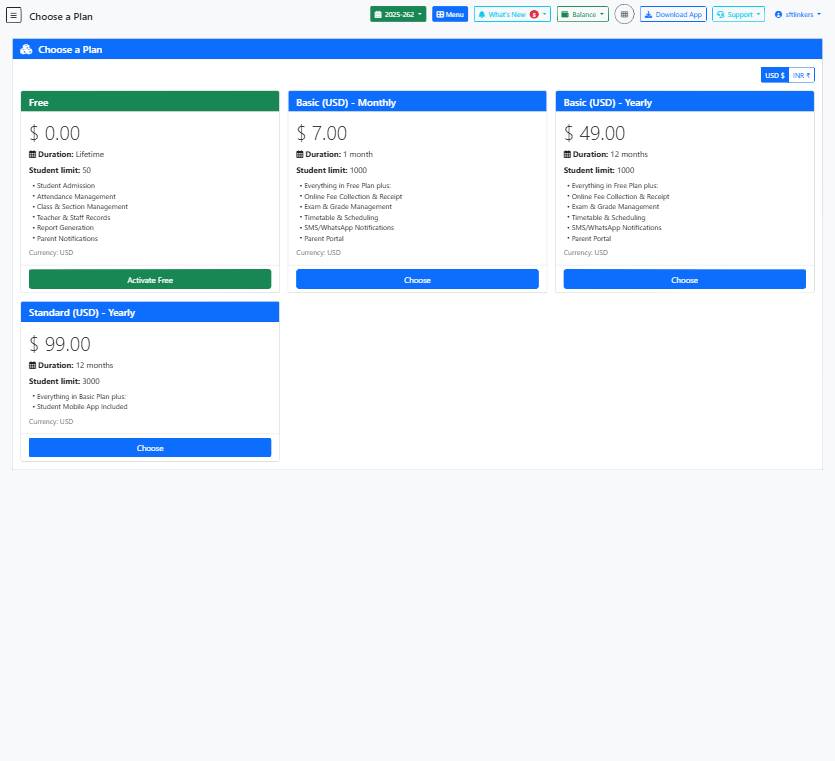
This help guide provides step-by-step instructions for selecting a plan on the school management software page.

📋 Step-by-Step Instructions

  1. Enter your details in the text field provided.
  2. Provide additional information in the textarea field if required.
  3. Select the checkbox if applicable for your plan choice.
  4. Click on the 'Menu' button to access more options.
  5. Toggle between USD ($) and INR (₹) currency options.
  6. Review the details of the available plans.
  7. Click on the 'Choose' button corresponding to the plan you want to select.

💡 Helpful Tips

  • Make sure to read the plan details carefully before making a selection.
  • Consider the student limit and duration of the plan to match your school's requirements.
  • Check the currency settings to ensure it aligns with your preferences.

⚠️ Important Notes

  • Ensure accurate information is entered in the fields to avoid errors.
  • Select the plan carefully as changes may not be reversible once confirmed.
  • Double-check the currency option before finalizing your choice.
Other Modules in Getting Started with School Management
Academic Sessions Page Guide
21
Complete guide for using Academic Sessions in the school management system....
Class List Page Guide
21
Complete guide for using Class List in the school management system....
Create School Page Guide
23
Complete guide for using Create School in the school management system....
Create Session Page Guide
38
Complete guide for using Create Session in the school management system....
Fee Collection History Page Guide
18
Complete guide for using Fee Collection History in the school management system....
Import Students Guide
25
Complete guide for using Import Students in the school management system....
Import Students Page Guide
43
Complete guide for using Import Students in the school management system....
Quick Setup Page Guide
27
Complete guide for using Quick Setup in the school management system....
School Calendar Guide
28
Complete guide for using School Calendar in the school management system....
School Dashboard Guide
30
Complete guide for using School Dashboard in the school management system....
School Information Setup
101
Configure school details and settings...
School Management System Guide
28
Complete guide for using School Management System in the school management system....
School Settings Guide
35
Complete guide for using School Settings in the school management system....
School Timetable Management Guide
24
Complete guide for using School Management System in the school management system....
Schools Page Guide
36
Complete guide for using Schools in the school management system....
Section List Page Guide
25
Complete guide for using Section List in the school management system....
Student Admission Page Guide
28
Complete guide for using Student Admission in the school management system....
Student Attendance Page Guide
32
Complete guide for using Student Attendance in the school management system....
Student List Page Guide
26
Complete guide for using Student List in the school management system....
Subject Groups Page Guide
24
Complete guide for using Subject Groups in the school management system....
Subject List Page Guide
25
Complete guide for using Subject List in the school management system....
Timetable Periods Guide
26
Complete guide for using Timetable Periods in the school management system....
Academic Sessions Setup
102
Set up academic years and sessions...
Student Admission Form
123
This form allows you to add new students to the school management system. Please fill in all required details accurately...
Add New Staff Member
69
This form is used to register teachers, administrators, and other staff members into the system. Please fill in all requ...
Was this article helpful?
Share this article