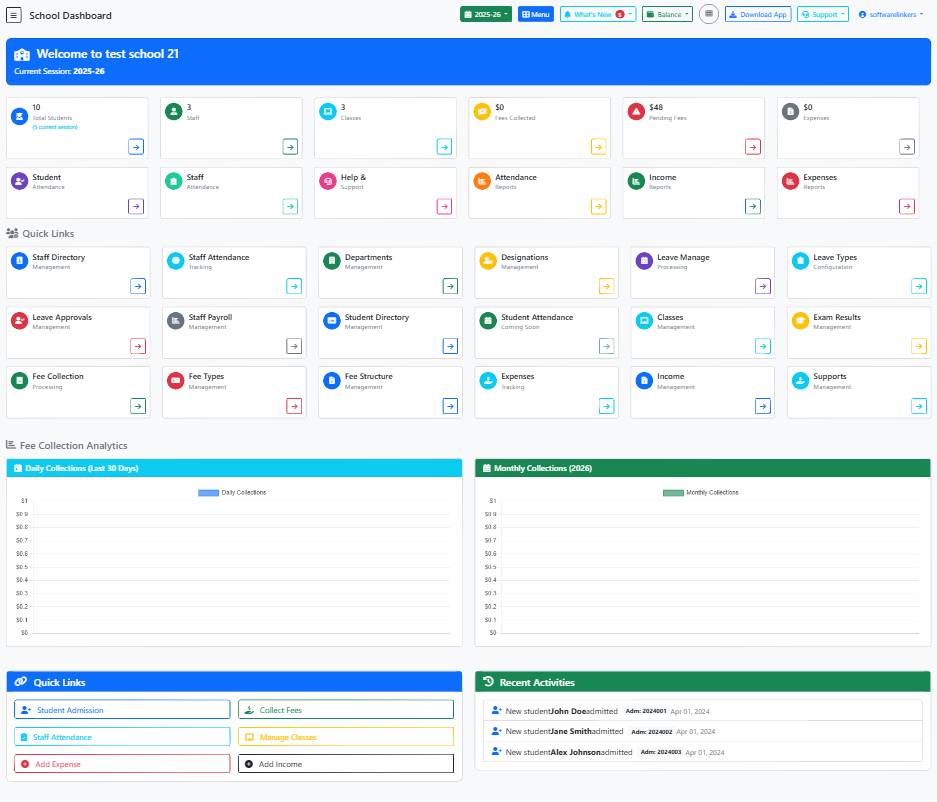
School Dashboard Guide
This help guide provides assistance on using the School Dashboard page for school management purposes.
📋 Step-by-Step Instructions
- Access the School Dashboard page by navigating to /school/dashboard.php in your web browser.
- Review the summary section to get an overview of important information like total students, staff count, classes, fees collected, pending fees, and expenses.
- Utilize the form fields provided (text, textarea, checkbox) for entering and managing relevant data.
💡 Helpful Tips
- Regularly update the current session year to ensure accurate reporting and tracking.
- Use the Menu button to access additional options and features available in the dashboard.
- Monitor pending fees closely to follow up with students or parents for timely payments.
⚠️ Important Notes
- Ensure data entered in the form fields is accurate and complete to prevent errors in school records.
- Exercise caution when making changes to session details or fee information to avoid discrepancies.
- Contact technical support if you encounter any issues or require further assistance while using the School Dashboard.