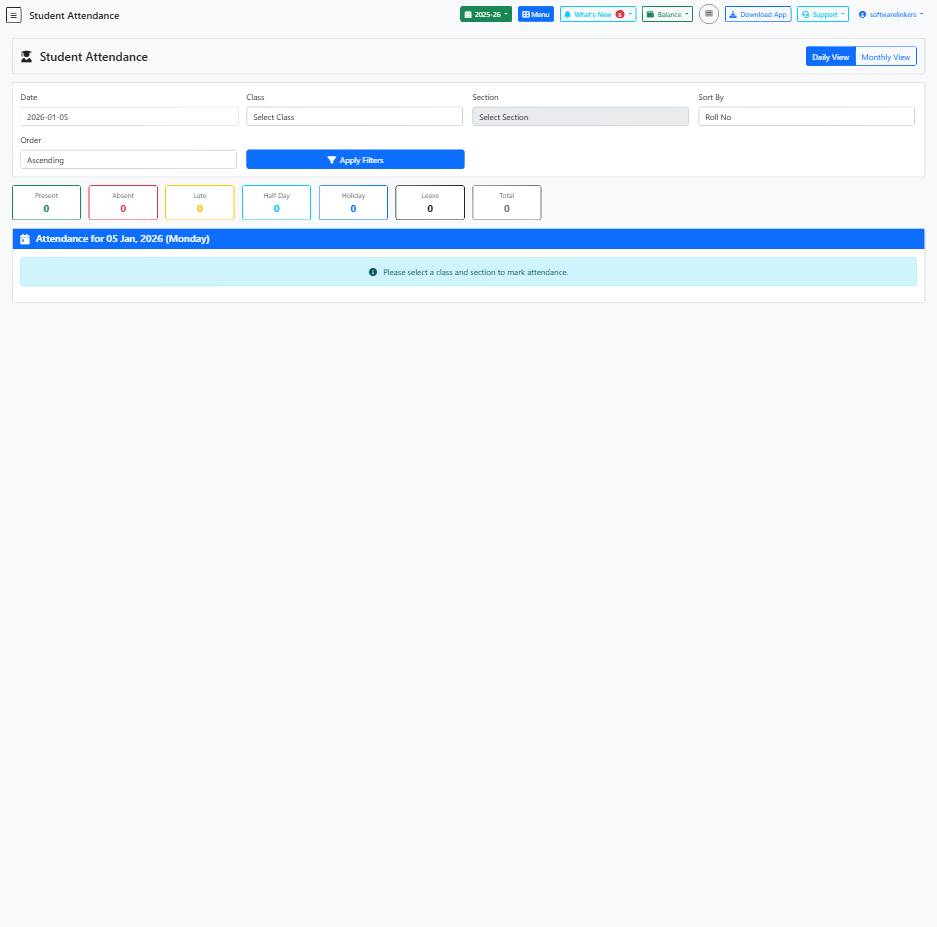
Student Attendance Page Guide
This guide helps you manage student attendance efficiently by sorting and filtering records.
📋 Step-by-Step Instructions
- Enter the Date for which you want to view attendance.
- Select the Class and Section from the dropdown menus.
- Choose the Sort By criteria and Order preference.
- Click on the 'Apply Filters' button to display the attendance records.
💡 Helpful Tips
- Use the 'Daily View' button to switch between daily and monthly attendance view.
- Ensure correct Class and Section selections for accurate attendance data.
- You can toggle between Ascending and Descending order for viewing records.
⚠️ Important Notes
- Make sure to apply filters before viewing attendance data.
- Incorrect date or selection may display inaccurate attendance information.
- Check the 'Present' count after applying filters to verify attendance data.